
Your notebook
What the notebook is, what each part of it is for, and the plain files underneath.
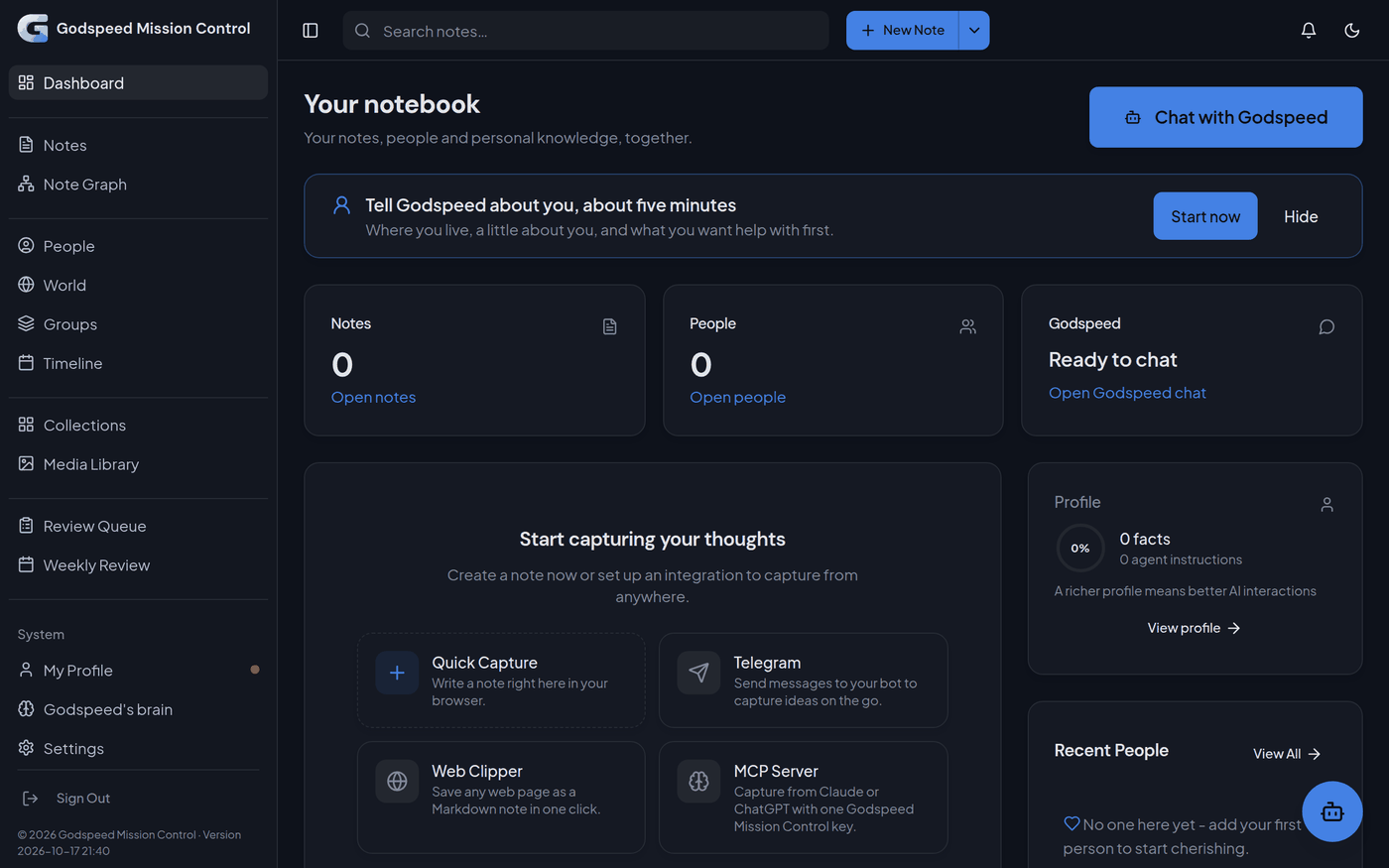
The notebook is the web app of Godspeed Mission Control. It is where you talk to Godspeed and see everything it keeps for you: notes, people, what happened when, the numbers you track. Godspeed reads and writes the same notebook you see. What it saves in the chat shows up on these pages, and what you change there is what it knows.
On your own computer the notebook opens at http:/ and asks for no sign-in, because no other device can reach it. On a server it has an https:/ address, and you sign in with your username and password.
What each part is for
#- Dashboard: the start page, with the big Chat with Godspeed button.
- Goals: each goal, its weekly number, what was done for it and whether the number moved (Add, follow, change or stop a goal).
- Notes and Note Graph: your notes in folders, and a map of how they connect.
- People, Groups, World and Timeline: a page for each person, groups such as a club, the things around you (your car, your flat), and what happened when.
- Collections: tables of things you keep in order, such as a reading list. What you track has its own Trackers shelf here.
- Media Library: every picture and PDF in your notes.
- Review Queue and Weekly Review: what Godspeed found by itself and waits for your yes, and a summary of what you captured lately.
- Under System: My Profile and Godspeed's brain (what it knows about you, and its rules), Settings, the chat as a full page, and Documentation, this guide.
One note, three pages
#Say you write a note: "Lunch with Maria. She starts at the bakery on Monday." A few minutes after you stop writing, your AI reads it, as it reads every new note you write. It suggests what it found, such as a page for Maria and the fact that she works at the bakery. Those wait in the Review Queue. Click Keep, and Maria's page under People shows the fact, with your note among her Related Notes.
Nothing it found by itself lands on your pages without your yes. What you tell Godspeed directly, such as "Maria moved to Berlin", is saved at once. How it remembers explains why.
Plain files underneath
#Every page of the notebook is also a plain text file (Markdown) in the notebook/ folder of your mission control folder. You can open these files in Obsidian or any text editor, and changes you make there are read back.
- Notes sit in their own folders, such as
notebook/.Health/ Running plan.md - People are in
People/, things inWorld/, moments inTimeline/and collections inCollections/. - Facts are in
Facts/, and replaced facts inFacts/.Earlier/
The notebook knows a file by the short header at its top, not by its name, so a file you move by hand is still found. To rename or move a page for good, change its title or folder in the notebook. The folder notebook/ holds the notebook's own bookkeeping, including earlier versions of every page.
Related
#Something wrong or unclear? Tell us on GitHub.